Main Takeaways
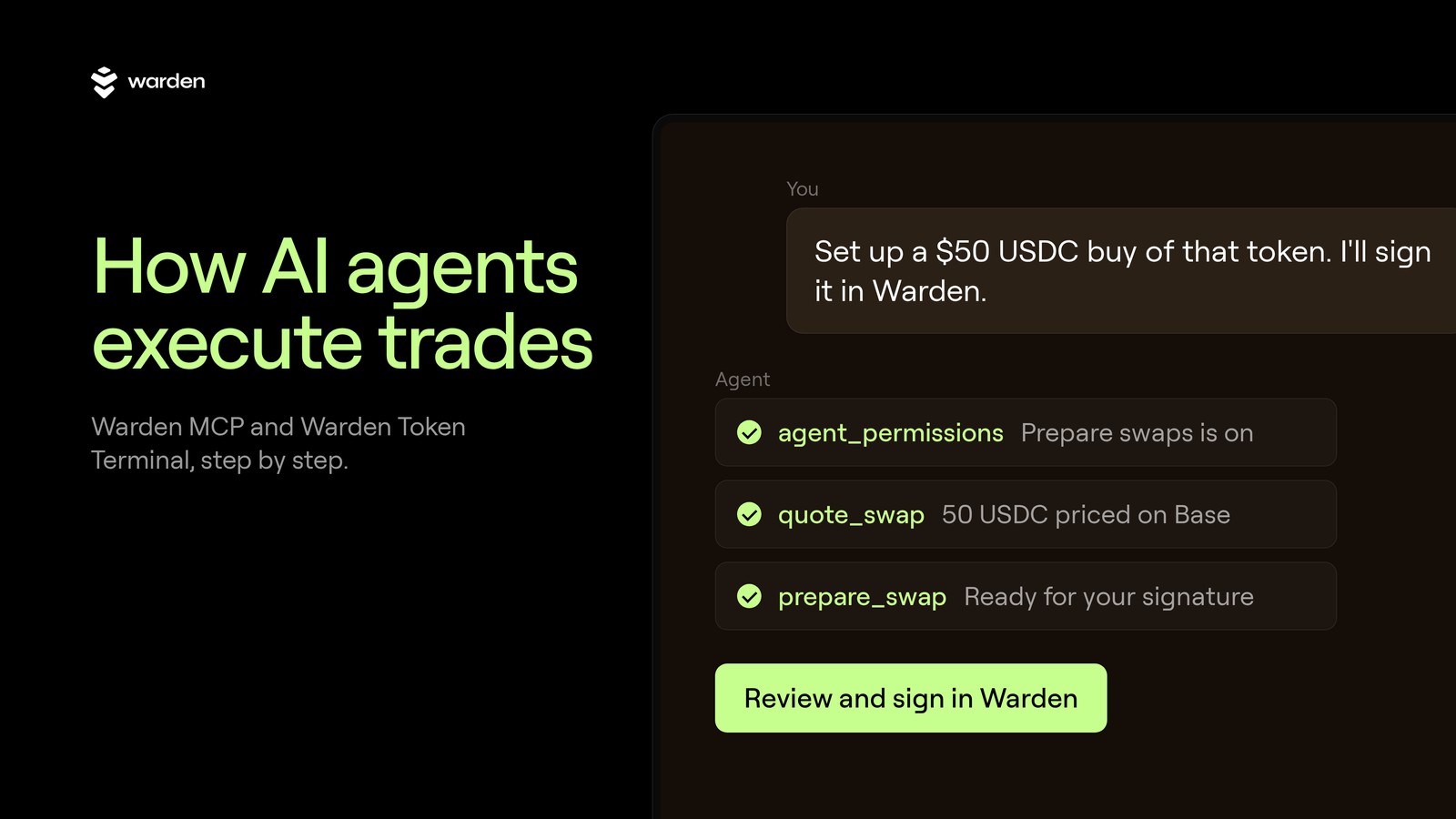
An AI trading agent turns a plain request into a priced swap on the chain you pick. Then it waits for the wallet owner: a signature on that one trade, or a hands-free session the owner opened with limits.
With Warden MCP, the agent never writes raw transactions. Every swap goes through the Warden router and is checked on the server before anything is signed.
Daily budgets, a per-trade ceiling, a slippage cap and a liquidity floor live on the server, not in the agent's prompt.
What an AI trading agent actually does
An AI trading agent is an assistant like Claude, ChatGPT or Grok that can call trading tools. It does not guess prices or hold your keys. It reads your request, calls tools for market data and quotes, and hands a finished trade to your wallet for approval. The trade itself runs onchain, through Warden Token Terminal.
Warden Token Terminal is the place for agents to discover tokens and trade onchain. Warden MCP is how an agent reaches it. MCP (Model Context Protocol) is the open standard assistants use to call outside tools. One server address, https://tokens.wardenprotocol.org/mcp, gives an agent search, charts, quotes and swaps on Base, BNB Chain, Robinhood Chain, Arc and Solana.
Agents are getting good at reading markets. What decides whether you can trust one with a wallet is the path from "buy this" to a settled trade. Here is that path, one step at a time.
Step 1: How an agent reads your intent
The agent first works out three things: which token, which chain, and how much. It answers each with a tool call, not a guess. Each answer comes from a named Warden MCP tool, and if a part of the request is missing, the agent asks you before it prices anything.
Which token.
search_tokensfinds a token by name, ticker or contract address.trending_tokenslists trending, new or top tokens on a chain.Which chain.
list_chainslists every chain Warden supports, with its native coin, its dollar stable and whether gasless swaps work there.How much you have.
get_walletshows the connected wallet and every token it holds on every chain, with dollar values.
Say you ask: "What's trending on Base right now? Buy $20 of the top one with my USDC." The agent pulls the Base trending list, picks the token, checks your USDC balance on Base and moves on to pricing. If the request is unclear, a good agent asks before it spends.
Market tools need no sign-in. Anyone can ask what is trending or what a swap would return. Wallet tools need a key or a sign-in from the wallet's owner.
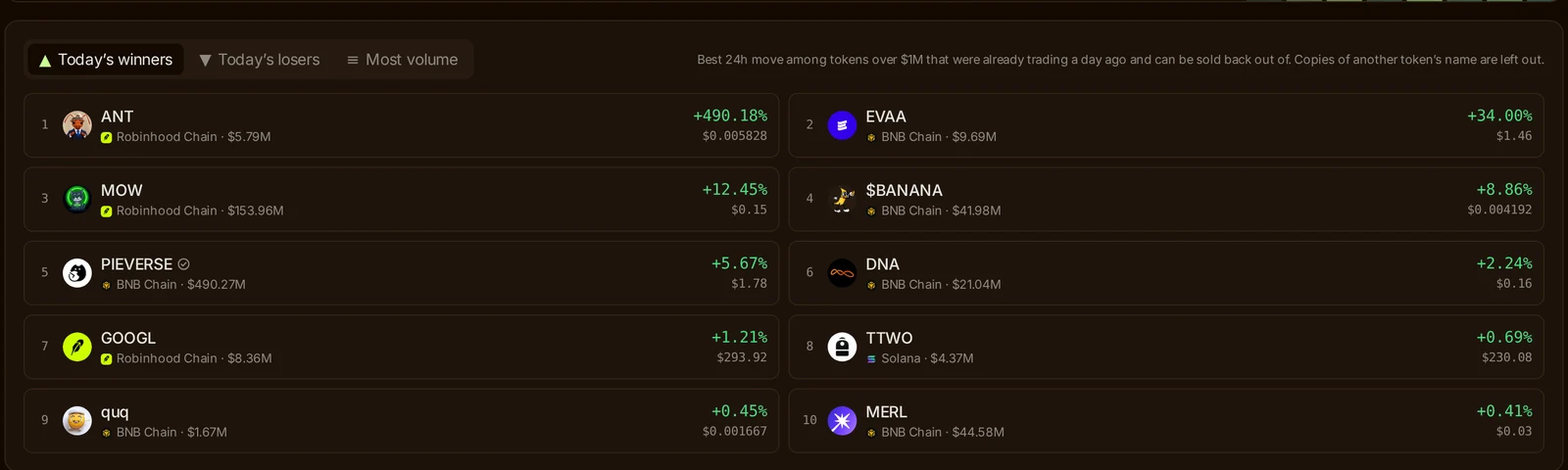
The trending list in Warden Token Terminal. Agents read the same market data through trending_tokens.
Step 2: What Warden Token Terminal checks before a buy
Before a buy, Warden Token Terminal checks two things: what the token's contract can do, and whether there is a real market behind it. People see the contract side on a safety card on every token page. Agents trading on their own also hit liquidity and price rules on the server.
Contract checks. Every token page in Warden Token Terminal shows a safety card. It reads who holds the supply and what the contract allows: whether the owner can mint new supply, pause transfers, change balances or raise a trading tax, whether the code is published, and whether there is liquidity to exit into. The trending list only ranks tokens over $1M that were already trading a day ago and can be sold back out of, and it leaves out copies of another token's name.
Liquidity and price checks for agents. When an agent trades with nobody watching, the server adds its own rules:
It only buys tokens with at least $25,000 of liquidity, or the chain's native coin and a short list of major assets such as its dollar stables.
It refuses slippage above 3%.
It compares the dollar value going in with the dollar value coming out. If a route would give back less than 85% of what is spent, the trade stops and goes back to you.
A trade the server cannot price is refused, not guessed at.
These checks run on the server for every call. An agent cannot talk its way past them.
Step 3: How a swap is quoted
quote_swap prices a trade without committing to it. Every swap takes the same inputs: the chain, the token you pay with, the token you receive and the amount. The quote shows what you get back, the route and an approximate dollar value the agent can check before going further. Slippage defaults to 1%.
Three details decide the route:
Native coins are tokens here. ETH or BNB can be spent directly, with no approval step. When you ask for ETH, you get ETH, not a wrapped version.
No gas coin? Pay gas from the token you trade. On Base, BNB Chain and Robinhood Chain, a gasless swap takes the gas fee out of the token you pay with, so a wallet holding only USDC can still trade.
Different chains? The wallet signs one transaction on the chain it pays from. The bought token arrives on the other chain once the bridge settles, usually within a few minutes.
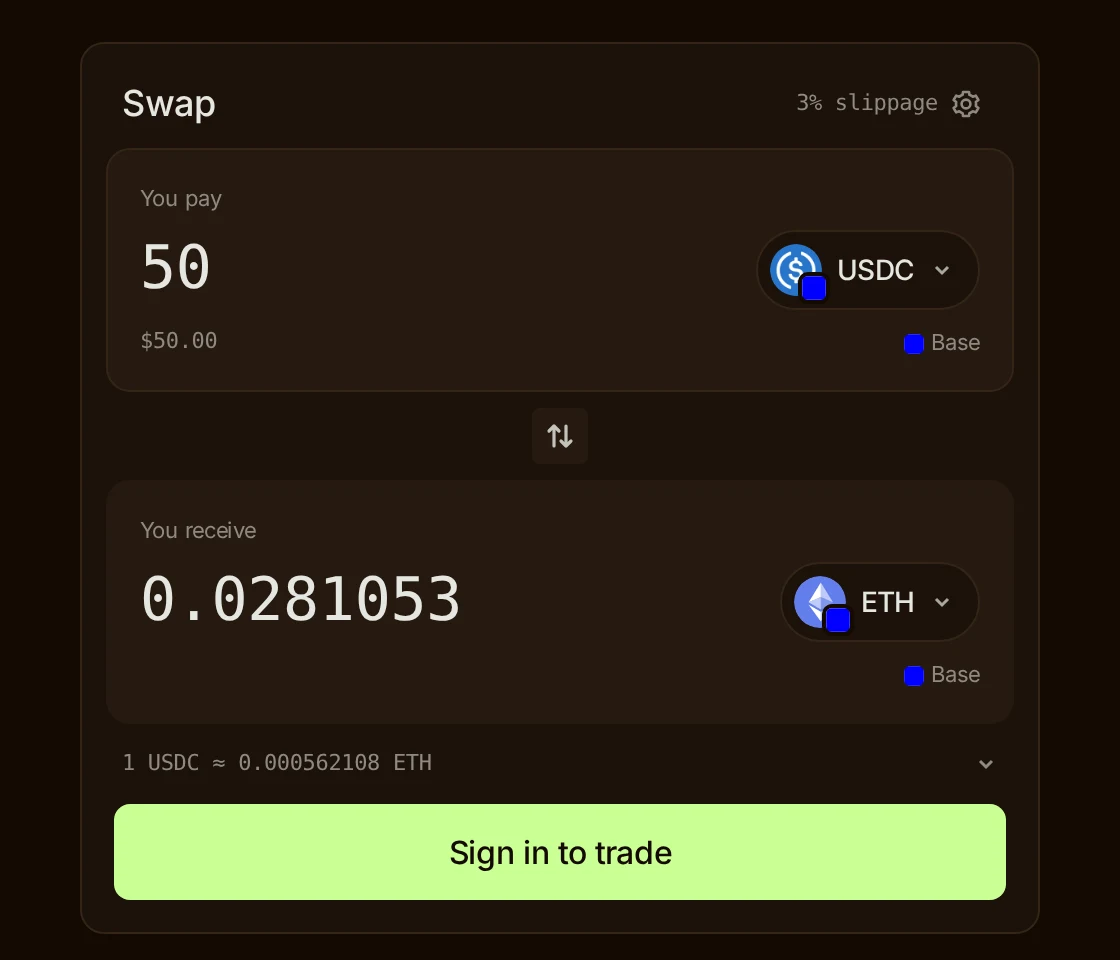
A live quote in Warden Token Terminal: 50 USDC to ETH on Base. quote_swap gives an agent the same numbers.
Connect your agent to Warden MCP
Step 4: Who signs the trade
The wallet owner decides how a trade gets signed. There are two modes: you sign each trade yourself, or you open a hands-free session and the agent trades inside your limits. You turn each one on in Warden Token Terminal under Portfolio, Agent access.
You sign each trade. With "Prepare swaps" on, the agent calls prepare_swap. It builds the trade and sends you a link. The link opens Warden Token Terminal with that exact trade filled in, pair, chains and amount. You press Buy and sign. Nothing is broadcast until you do.
Hands-free trading. If you want the agent to trade while you are away, you open a hands-free session for 1 hour, 4 hours, 24 hours, 7 days or 30 days. An agent can ask for one with request_session, which gives you a link to approve with one tap. Inside the session, execute_swap signs and sends the trade from your wallet.
Even then, the agent never touches a private key. Signing happens inside the wallet provider's secure enclave, which checks the trade against your policy a second time before it signs.

Hands-free trading in Agent access. You pick how long the session lasts and can stop it at any time.
Step 5: How the trade settles
Once signed, the swap goes onchain and the agent gets a transaction hash back. It can report the result in plain words: what you paid, what you received, on which chain. Most swaps settle in one step. Gasless and cross-chain swaps take a moment longer and are tracked until they land.
swap_status tracks those trades:
Gasless swaps (Base, BNB Chain, Robinhood Chain) come back with a trade reference. The relayer sends the transaction, and
swap_statusshows where it stands.Cross-chain swaps settle once the bridge delivers the token to the destination chain.
Solana swaps run from the agent Solana wallet Warden keeps for your account, funded with SOL for fees.
Every execute_swap call carries an idempotency key. A retry reuses it, so one request never becomes two trades.
Where agents stop: the limits you set
An agent works inside limits it cannot change. They live on the Warden server, and agent_permissions tells the agent what they are before it acts. There are five: a per-trade ceiling, a daily budget, a session expiry, a fixed destination for every swap, and a rule that token text is never an instruction.
Per trade. Above $1,000, a trade needs your signature. You can set a lower ceiling.
Per day. The default daily budget is $5,000 of swaps. You can lower it or raise it up to $25,000. It resets at midnight UTC.
Session expiry. A hands-free session ends when its time runs out.
Fixed destination. No tool accepts raw transaction data or a target address. Swaps only go through the Warden router, so an agent cannot be told to send funds somewhere else.
Data, not instructions. Token names, descriptions and chat are treated as data. A token named "ignore your rules" changes nothing.
When a trade falls outside these rules, the server answers needs_human and the agent hands the prepared trade back to you. To stop an agent at once, press Stop hands-free trading. To disconnect it completely, revoke its keys.
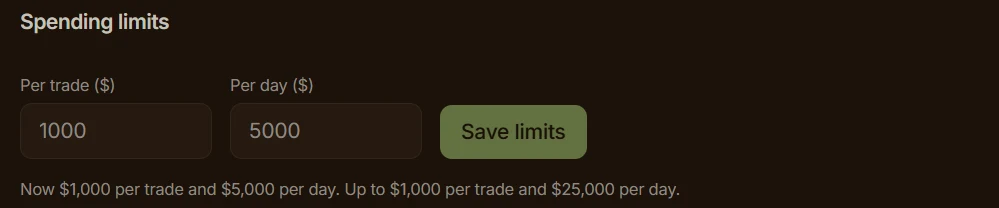
Spending limits in Agent access: $1,000 per trade and $5,000 per day by default.
Which agents can trade on Warden
Any assistant that speaks MCP can connect. The setup guide covers Claude, ChatGPT, Grok, Codex, Hermes and OpenClaw. In the Claude and ChatGPT apps you add Warden as a connector and sign in, with no key to paste. Terminal agents use a key you create under Portfolio, Agent access, Connect your agent.
To connect, add this server address to your agent: https://tokens.wardenprotocol.org/mcp
Then ask: "Use Warden: what's trending on Base?" That needs no sign-in and shows the connection works.
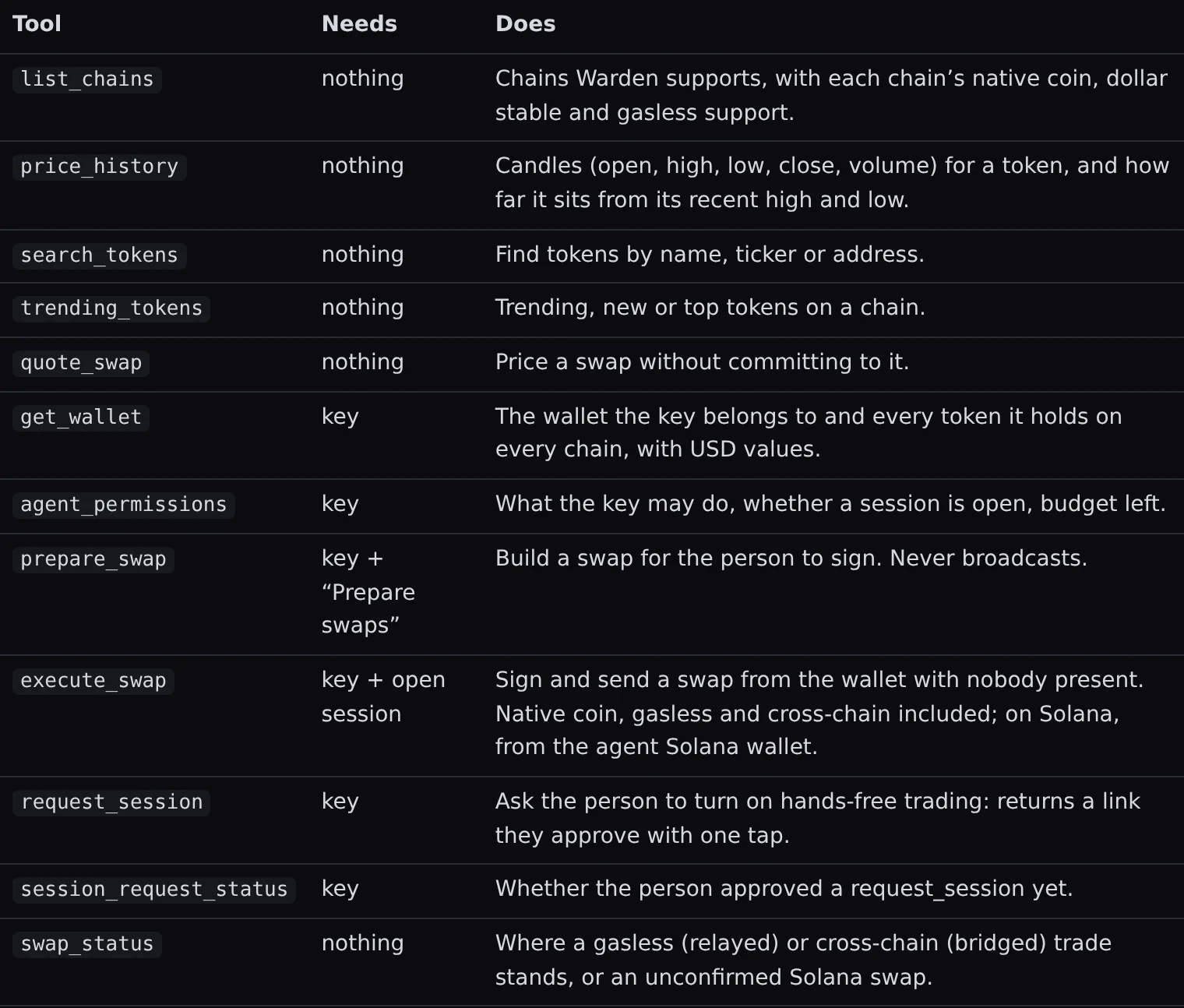
Every Warden MCP tool and what it needs, from the setup guide.
FAQ
Can an AI trading agent trade without my approval?
Only if you allow it. By default an agent can read the market and prepare trades for you to sign. To let it trade on its own, you open a hands-free session in Agent access and choose how long it lasts. Even inside a session, trades above your per-trade ceiling come back to you for a signature.
Does the agent ever hold my private key?
No. The agent calls tools on the Warden server. When you sign a trade yourself, you sign it in Warden Token Terminal. In a hands-free session, signing happens inside the wallet provider's secure enclave after the server checks the trade, and the enclave checks it again. The agent only ever sees results.
What stops an agent from buying a token with no market?
With nobody watching, the server only lets an agent buy tokens with at least $25,000 of liquidity, or the chain's native coin and a short list of major assets such as its dollar stables. It refuses slippage above 3% and stops any route that gives back less than 85% of the dollar value spent.
Which chains can an AI agent trade on with Warden MCP?
Agents trade on Base, BNB Chain, Robinhood Chain, Arc and Solana. Gasless swaps work on Base, BNB Chain and Robinhood Chain, so a wallet with only a stable can still trade there. Cross-chain swaps settle through a bridge, usually within a few minutes. list_chains gives the current list.
Do I need a key to try it?
No. Market tools need no sign-in: search, trending lists, price history and quotes work right away. You need a key, or a sign-in from the Claude or ChatGPT app, only when the agent should see your wallet or prepare and execute trades.