Main Takeaways
Warden Token Terminal is the app where you find, check and trade tokens. Warden Swap is the swap box inside it. Warden MCP connects your AI agent to Token Terminal, so the agent can trade for you within limits you set. The quickest way to trade is to let your agent do it through Warden MCP. If you prefer to click yourself, open Token Terminal and swap there. It covers six chains: Base, BNB Chain, Robinhood Chain, Arc, Solana and Elysium.
Token Terminal, Warden Swap and Warden MCP: what is the difference?
Think of it like this:
Warden Token Terminal is the app. You open it in your browser, search for a token, look at its price, chart and numbers, and trade it. Everything happens in one place, with one account.
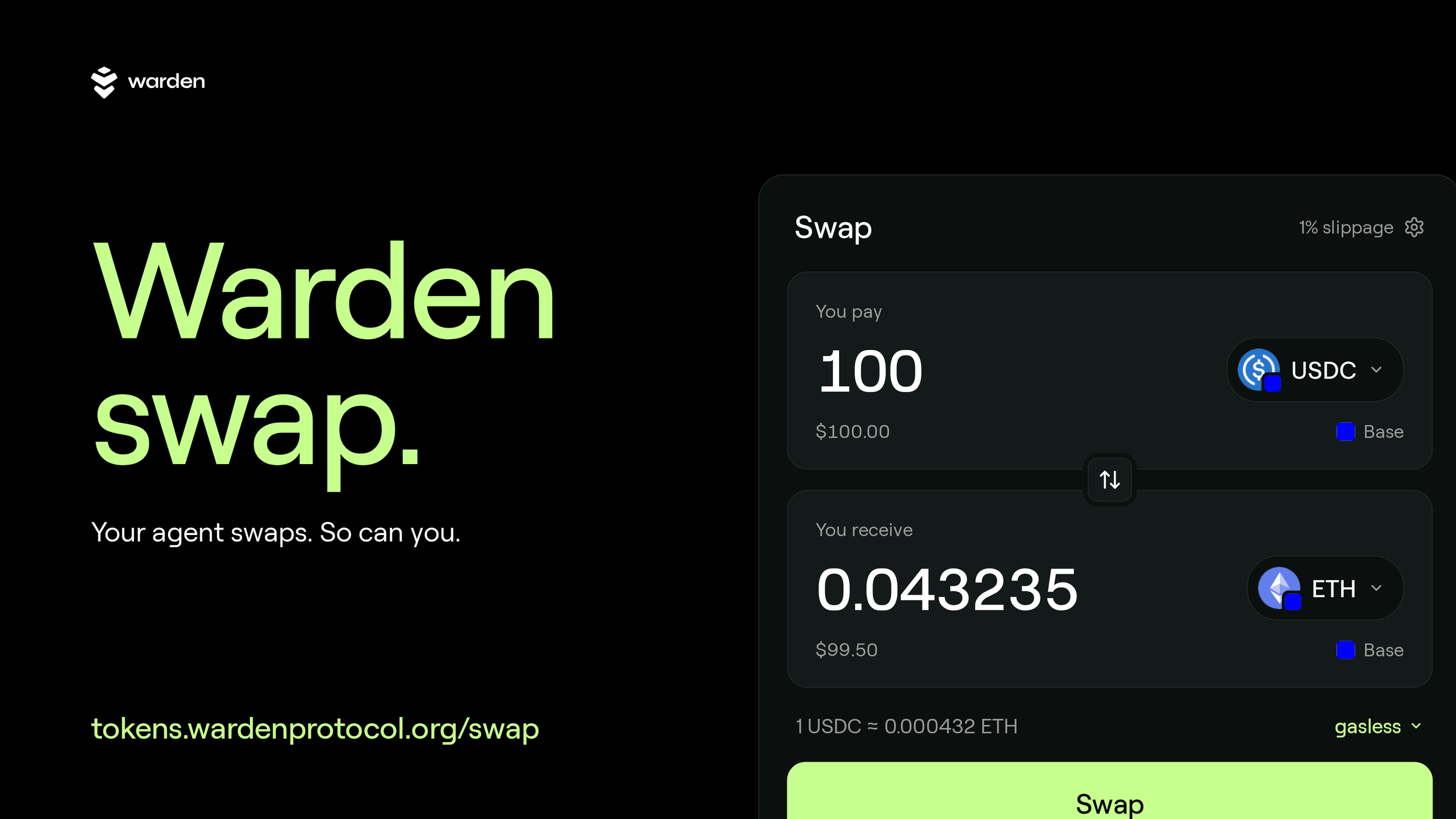
Warden Swap is one button inside that app. It is the part of Token Terminal where you trade one token for another. You do not need a separate app or login for it. When you trade on Token Terminal, you are using Warden Swap.
Warden MCP lets your AI agent use Token Terminal for you. You connect it once to an assistant such as Claude, ChatGPT or Grok. Then you can type "Quote 50 USDC to WARD on Base" and the agent finds the price and the route and, once you allow it, makes the trade. You stay in control: the agent works inside the limits you set.
Our recommendation: use Warden MCP if you already use an AI assistant, and Token Terminal if you want to see everything on screen. Both use the same swap underneath, so prices, fees and protections are the same. Revenue from Warden Token Terminal goes into buying back WARD.
Trade with your AI agent through Warden MCP
Warden MCP is the easiest way to trade on Warden. Your agent can ask for prices without any key and prepare swaps for you to sign. Once you open a hands-free session, it can also make swaps on its own, up to the limits you set. Warden MCP works with the Claude app, Claude Code, ChatGPT, Dots, Grok, Codex, Hermes and OpenClaw.
The agent uses three tools:
quote_swap gets a price for a swap. A quote is only a price: nothing is bought.
prepare_swap builds the transaction and hands it to you to sign. It never sends anything itself.
execute_swap signs and sends a swap, and works only while a hands-free session is open.
To start a hands-free session, your agent sends you a link and you approve it with one tap. You choose how long it lasts: 1 hour, 4 hours, 24 hours, 7 days or 30 days. By default, the agent can spend up to $1,000 per trade and $5,000 per day. You can raise the daily limit to $25,000. The per-trade limit stays at $1,000. Agent swaps use 1% slippage by default.
Through Warden MCP your agent can trade on Base, BNB Chain, Robinhood Chain, Arc and Solana. Elysium is in Token Terminal today and is not yet part of Warden MCP.
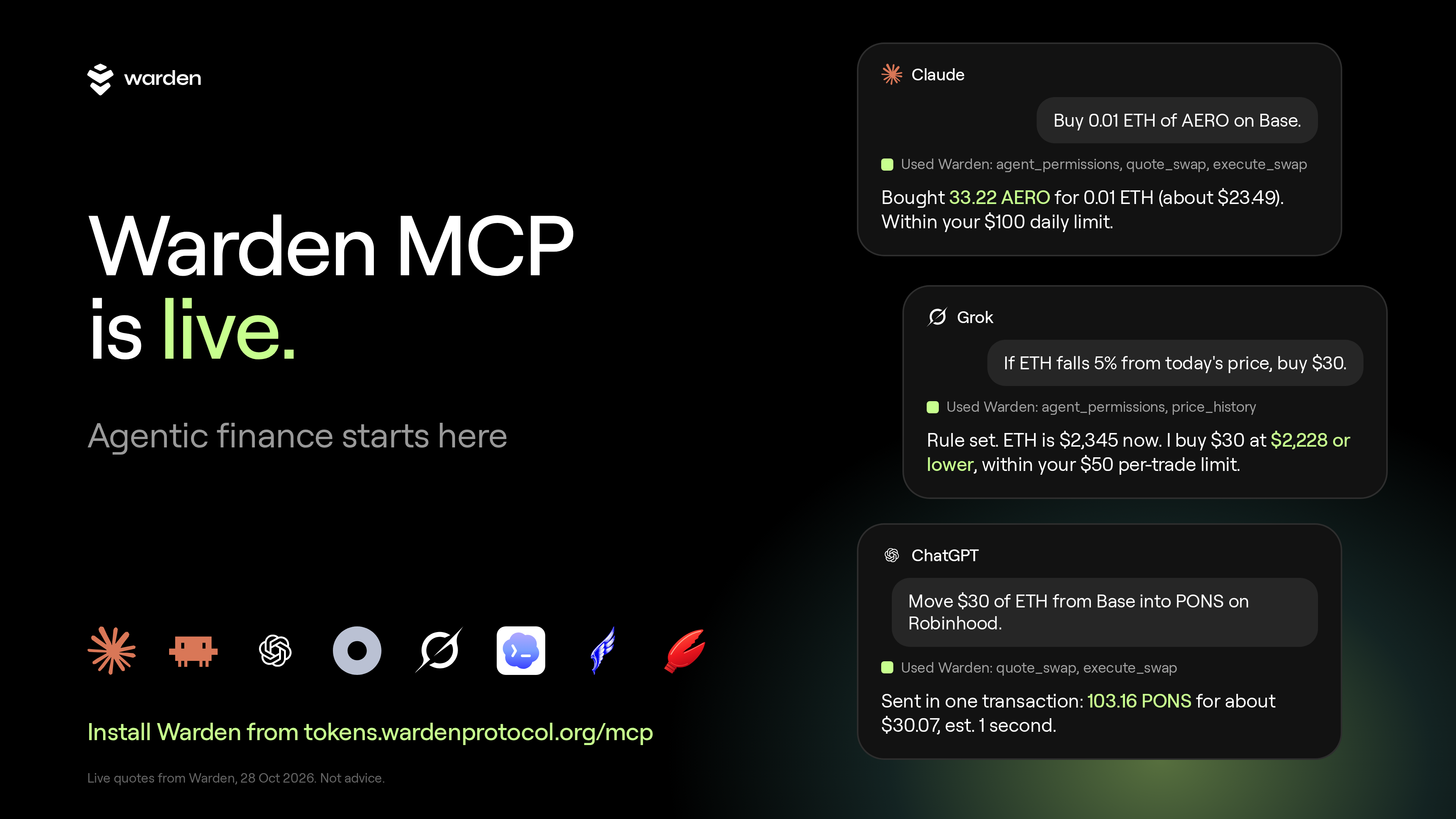
A good first prompt: "Quote 50 USDC to WARD on Base." The agent replies with the price, the route and the fee. Nothing happens to your funds until you sign or open a session.
Which chains and tokens can I swap?
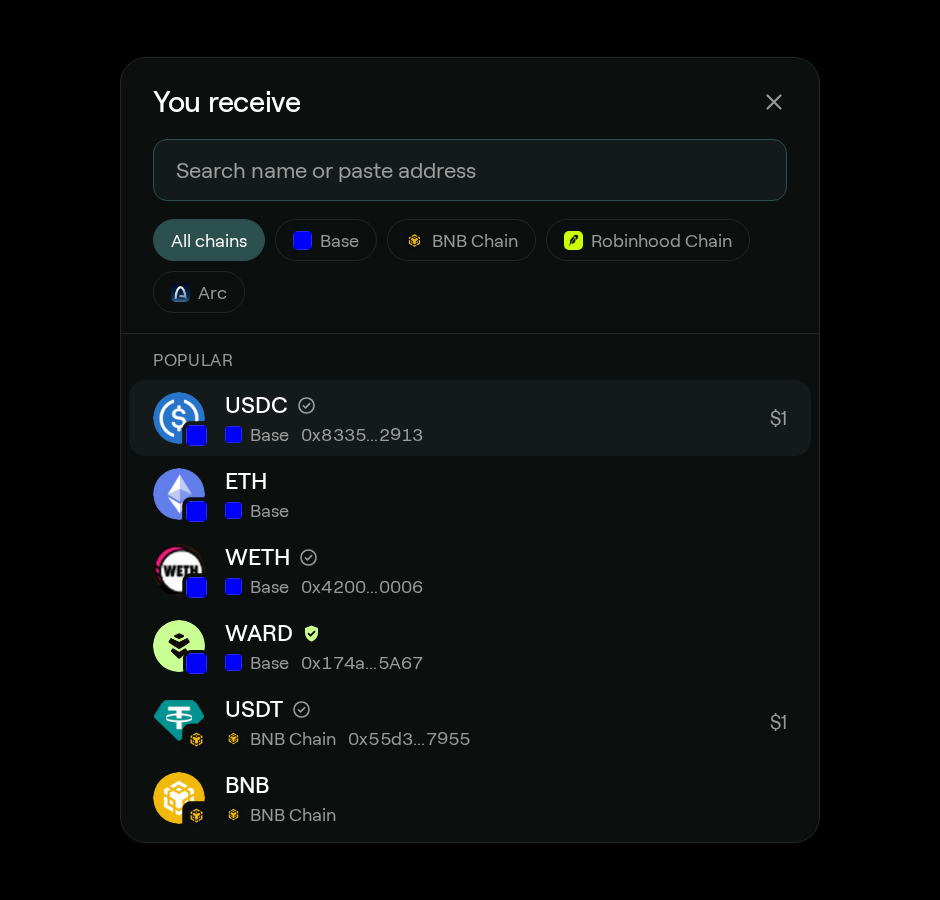
Warden Token Terminal, and the swap inside it, works on six chains: Base, BNB Chain, Robinhood Chain, Arc, Solana and Elysium. The token picker lists popular tokens for each chain. You can also search for any listed token by name or paste its contract address.
Popular tokens in the picker:
Base: USDC, ETH, WETH and WARD
BNB Chain: USDT, BNB, WBNB and WARD
Robinhood Chain: USDG, ETH, WETH and WARD
Arc: USDC
Solana: SOL, USDC and USDT. Every Solana swap has SOL, USDC or USDT on one side.
Elysium: search for any Elysium token by name or contract address. Elysium is a new, fast Layer 2 with a block about every 100 milliseconds.
Pick a chain to see only its tokens, or leave the filter on "All chains" to search them all at once. Every token shows which chain it is on, so you know where your swap will run.
How do I swap tokens on Token Terminal?
A swap by hand takes four steps: sign in, pick your tokens, check the details and confirm. You can sign in with email, Google, X, a passkey or a wallet you already use. Warden never gets access to your private keys. You can top up with a debit or credit card, or use crypto you already hold.
Sign in. Open the swap page, tap "Sign in to swap" and choose how to log in.
Pick your tokens. Under "You pay", choose the token and chain you are spending. Under "You receive", choose the token you want, for example USDC on Base for ETH on Base. The switch button between the two reverses the pair.
Check the details. Tap the gear to set "Max slippage" to 0.5%, 1%, 3% or 5%. The swap page resets it to 3% each time you open it. Open the details to see Route, Min received and Platform fee. When a route can be gasless, a Gas line shows as well.
Confirm. Review the trade and sign it. The swap settles onchain.
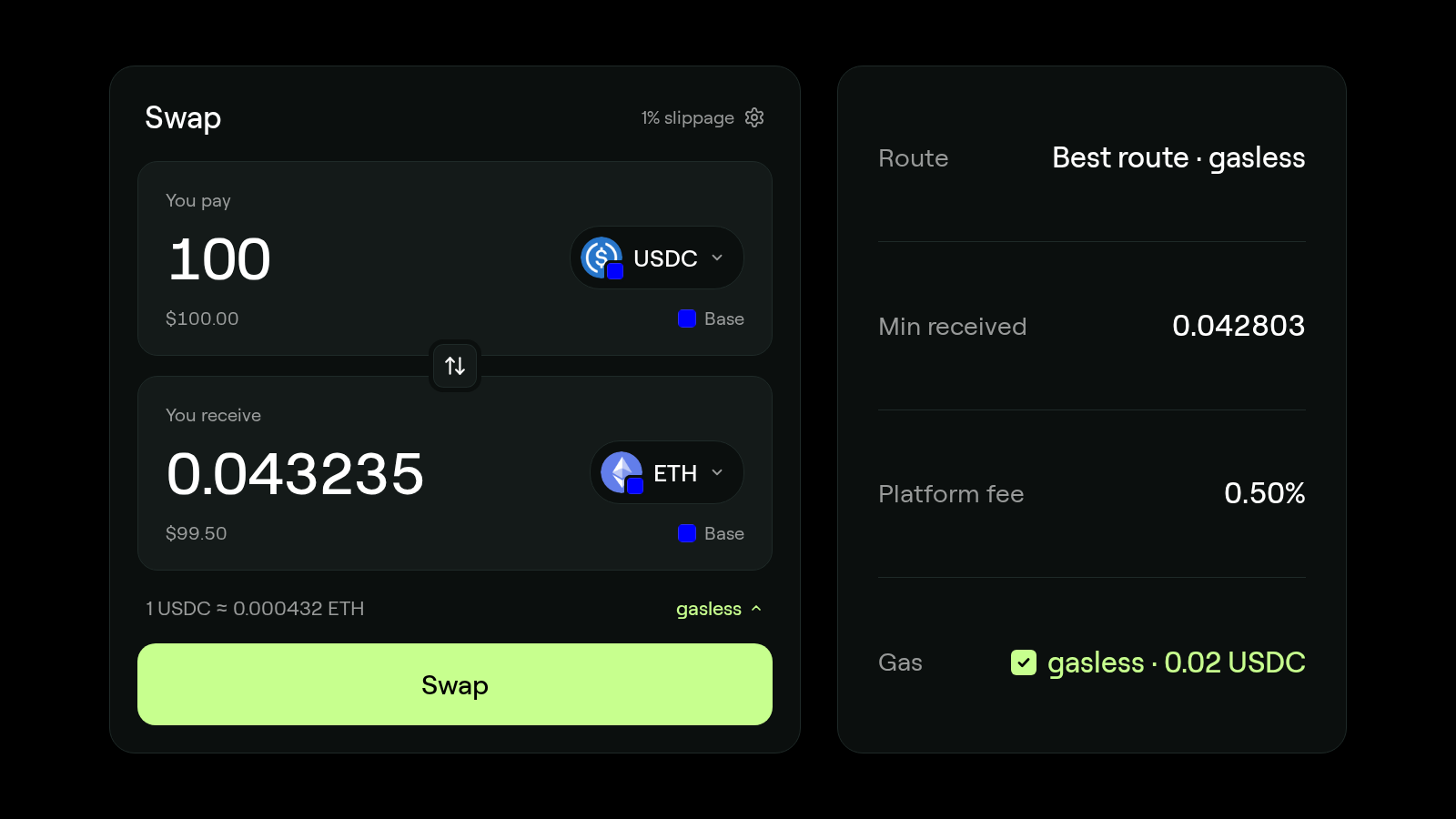
Min received is the least you will get. If the price moves further than your slippage allows before the trade goes through, the swap does not happen, so you never end up with less than that amount.
Swap across chains in one step
You can pay with a token on one chain and receive a token on another, all in one swap. You do not need to bridge first. This works between Base, BNB Chain, Robinhood Chain and Arc. Solana swaps stay on Solana.
If you hold USDC on Base and want WARD on Base, that is a normal swap. If you hold USDT on BNB Chain and want a token on Base, pick both and the button changes to "Swap and bridge". The swap card shows the chain you pay on, the chain you receive on and roughly how long it will take.
A few pairs cannot be bridged in one go. Those need two signatures, and the card tells you before you start.
Gasless swaps on Base, BNB Chain and Robinhood Chain
On Base, BNB Chain and Robinhood Chain, a swap can be gasless, so you do not need ETH or BNB in your wallet to cover gas. This works when both tokens are on the same chain and you pay with a token rather than the chain's native coin. A relayer, a service that submits the transaction for you, covers the gas and takes the cost out of the token you pay with.
When a swap can be gasless:
It is on Base, BNB Chain or Robinhood Chain. Swaps on Arc, Solana and Elysium pay gas the usual way.
Both tokens are on the same chain. Cross-chain swaps pay gas the usual way.
You pay with a token. Paying with ETH or BNB is a regular swap with regular gas.
The gas cost comes out of the token you pay with.
The first time you swap a token, you may need to approve it once, and that approval costs gas. After that, swaps of that token can be gasless.
Gasless routes show a lime "gasless" tag on the swap card. The "Gasless when possible" setting is on by default, with the note: "The relayer pays gas and takes it from the swap."
Fees and protection
Warden Token Terminal charges a 0.50% platform fee on each trade, and the swap card shows it before you confirm. Trades have MEV protection. Warden never gets access to your private keys, and every swap goes through Warden's own router. The fee is the same whether you trade yourself or through Warden MCP.
How each trade is protected:
One router. Every swap goes through Warden's router. No tool accepts raw calldata or a custom target address.
Two checks. Warden's server checks each trade, and the wallet's signing policy checks it again before it is signed.
Your limits. An agent session stops at the per-trade and per-day limits you set, and ends when its time runs out.
The contract address. Anyone can create a token with any name, so go by the contract address, not the name. Paste the address into search to find the exact token.
Numbers up front. Route, Min received and Platform fee are on screen before you sign, and so is Gas on a gasless route.
FAQ
What is Warden Swap?
Warden Swap is the token swap inside Warden Token Terminal. It is not a separate app: when you trade on Token Terminal, you use Warden Swap. You can swap yourself at tokens.wardenprotocol.org/swap, or let your AI agent do it through Warden MCP within limits you approve. It works on Base, BNB Chain, Robinhood Chain, Arc, Solana and Elysium.
What is the difference between Warden Swap, Token Terminal and Warden MCP?
Warden Token Terminal is the app where you find, check and trade tokens. Warden Swap is the swap inside it. Warden MCP connects your AI agent to Token Terminal so the agent can quote and make trades for you, within limits you set. All three use the same swap, fees and protections.
Should I use Token Terminal or Warden MCP?
If you already use an AI assistant, connect Warden MCP and trade by chat. It is the fastest way, and you can let the agent trade hands free within your limits. If you would rather see the chart and click yourself, use Token Terminal. You can use both with the same account.
Where is the official Warden Swap?
Warden Swap, built by Warden Protocol, is at tokens.wardenprotocol.org/swap. Other sites use similar names, so check that the address is tokens.wardenprotocol.org before you connect a wallet.
Which chains does Warden Swap support?
Six: Base, BNB Chain, Robinhood Chain, Arc, Solana and Elysium. Your AI agent can trade on the first five through Warden MCP. Cross-chain swaps run between Base, BNB Chain, Robinhood Chain and Arc.
Do I need ETH or BNB to swap on Warden?
Not always. On Base, BNB Chain and Robinhood Chain, a same-chain swap paid with a token can be gasless: the relayer covers the gas and takes it from that token. The first swap of a token may need a one-time approval that costs gas. Swaps on Arc, Solana and Elysium, cross-chain swaps and swaps paid with ETH or BNB use regular gas.
Can my AI agent swap tokens for me?
Yes. Add Warden MCP from tokens.wardenprotocol.org/mcp. Your agent can get quotes without a key and prepare swaps for you to sign. For hands-free trading, approve the session link your agent sends you. A session lasts from 1 hour to 30 days, with up to $1,000 per trade and up to $25,000 per day.
What does a swap on Warden cost?
Warden Token Terminal charges a 0.50% platform fee per trade, shown on the swap card before you confirm. The card also shows gas. On a gasless route, gas comes out of the token you pay with. Your max slippage, 3% by default on the swap page, sets the least you are willing to receive.
Start trading
Connect your agent with Warden MCP and trade by chat, or open Warden Token Terminal and swap on any of six chains.
Related reading: